I have already seen some peopl with the same problem but it didn’t help me to find a solution to my problem.
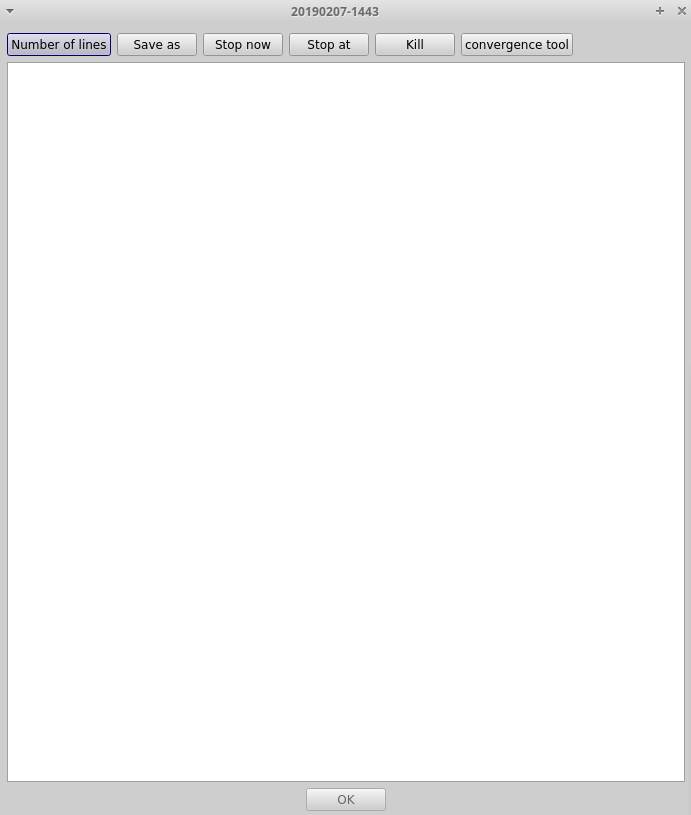
I would like to start a calculation thanks to the interface Code_saturne gui but when I do “Start calculation” (after saving my case), nothing happens except an empty white page with some buttons.
I tried several versions of Code_saturne and I also tried to run the file SCRIPTS/runcase and it worked, but with the new version 5.3.2, I saw that we could check the convergence thanks to the interface and I can’t try this without starting the calculation using the interface (?), so is there anybody here who had this problem and succeeded to solve it ?
I use residuals.csv and results in files probes_[…].dat to check convergence, but did you talk about using the convergence tools I saw in the interface or checking the files as I do ?
I would be happy to help, what do you want to know exactly ?
I can try to check this on another Ubuntu 18.04 install on VirtualBox. which version of Qt is installed/detected in your case ? I would assume Qt 5 and not Qt4, but both might be possible based on the packages you have. If you can post your config.log for Code_Saturne 5.3.2, I can determine this myself.
The issue you had seemed to appear mostly on machines with slow filesystems (or using distant filesystems
with higher latency), but some improvements had limited that issue. I’m not sure I can reproduce it but I’ll try (if I can reproduce it, the fix should not be the hardest part).
You can find as enclosed file the file config.log I had in the folder code_saturne-5.3.2.build/.
I hope you will find the information you want.
Yes, that’s what I thought : my (former) colleague had this problem too but only with his personal computer (using a virtual machine) and not in his computer at work, where he didn’t use a VM. But I don’t know if it is the same configuration for other people having the same problem and I don’t know either if it comes directly from the use of a VM or if it comes from the fact that using a VM is often linked with using slow filesystems.
I was not able to reproduce the issue on a Ubuntu 18.04 VM (under VirtualBox) runningon another Linux machine…
Trying to think of other factors that might change from one machine to another, do you have environment modules loaded or use another shell than bash ? I assume no, but if it is the case, that might be something to check.
No I don’t and I’m sorry but I can’t see anything which could cause a problem like this one.
I hope somebody having the same problem will see this post and participate to try to find a solution.
I can add an information, maybe it can help :
I just installed the version 4.0.9 of Code_Saturne and in the interface, when I want to check the mesh, I can do it launching in the gui (Calculation environment > Mesh Quality criteria > Check mesh) the button, it works !
But even in this version, the button “Start calculation” just open a window without starting any calculation.
Yes, we had observed this also. One difference is that the “check mesh” directly runs an executable through Python while running a full case runs a shell script (which itself calls Python code). This is why I asked if you used a shell different than bash (just in case)…
So we know the issue occurs with more layers of code, but still not why…
Today, my colleague needed to launch a calculation on my computer using the version 4.0.9 of Code_Saturne and it worked when I pushed the button “Start calculation”. So I re-tried with my study but it didn’t work.
I can’t publish the cases because it is very confidential but I will try to find what are the differences which may cause the problem on my own, maybe this week.
I hope that knowing that could help you too.
Is this a centralized install or you own install ? If it is a local install and modifying it slightly does not affect other users, I could try to add some additional logging to the Python scripts for version 4.0.9 that you could run (“hoping” you still reproduce the error) to try to understand more precisely where things lock up.
No, it is my own install.
I checked some fles but they are the same in both cases : SCRIPTS/runcase, DATA/saturneGUI and all directories are composed by the same files (except the name of the boundary conditions for example, and the xml file).
Could you try replacing BatchRunningView.py by the attached version in gui/Pages and reinstalling or directly in the install directory, under lib/<python_version>/site-packages/code_saturne/Pages ?
I have simply added some logging which might help in debugging (though several iterations will probably be necessary).
Do I have just to replace this file or do I have to do something else ? Because I put it in lib/<python_version>/site-packages/code_saturne/Page and it didn’t work, maybe because there is something else to do before.
How did it fail ? If I made a typo/syntax error (possible, I did it quickly), you should have an error message (an I can fix based on that). It the script runs but produces the same issue as before, you should hopefully have a bit more info in the terminal from which you ran the GUI, based on the added logging (but the initial bug will still be there).
Ok, that’s what I did but nothing has changed.
So I tried looking at the terminal and there is the message :
starting command: /home/noam/Documents/2-ESSAIS/SCRIPTS/runcase
before self.proc.start /home/noam/Documents/2-ESSAIS/SCRIPTS/runcase
after self.proc.start /home/noam/Documents/2-ESSAIS/SCRIPTS/runcase
dialog created
finished command: /home/noam/Documents/2-ESSAIS/SCRIPTS/runcase
Then, before I put BatchRunningView.py, I saw that in all versions of code_saturne, my new case (a new confidential study) is launched with the button.
But for example the case simple junction from the website does not work, even after I put the file you sent me and nothing appears on the termnial when I click on “start calculation”.
I can’t see where the problem happen (or if it is just a random problem ?!)